
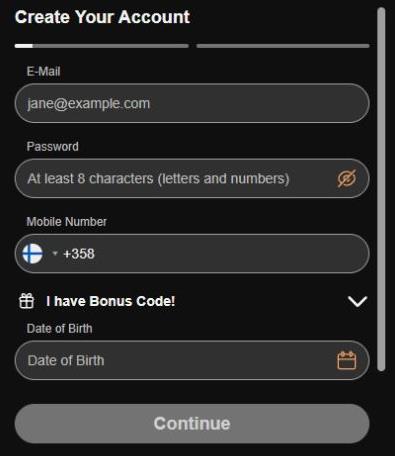
What goes in the four fields
For the direct route, type the address above the button into your browser. If you use the affiliate link, check the final domain first. The prompts after Continue can depend on your details and where you are.
- Use an inbox you can open. Read the address back before submitting it, including the part after the @ sign.
- The password hint asks for eight or more characters with both letters and numbers.
- Pick your country for the phone number. If the code is already there, type the remaining digits.
- Use the date of birth on your ID and the format shown in the form. The calendar control can help if day and month are easy to mix up.
When the form won’t submit
A grey Continue button usually means a field is incomplete. If your browser filled anything in, check what it actually entered. Old phone numbers and double country codes are easy to miss.
If the form says your email or phone is in use, try password recovery on the login page. Support can help you locate an existing account.
Age and identity checks
JoyCasino’s minimum age is 18, and the legal age where you are may be higher. Section 4.4 of the terms covers territory, residence and citizenship. The language of the form doesn’t establish your eligibility.
The operator may ask you to confirm an email address or phone number after the first screen. ID checks are separate. If JoyCasino requests a document, look for the instructions in your account.
Common questions
Where does an offer code go?
Select “I have Bonus Code!” on the first screen if your offer requires a code at sign-up.
Does the mobile form ask for anything different?
The mobile first screen we checked had the same four fields. A normal browser makes it easier to switch to your inbox or texts and return.
Where to check the details
- Sign-up form joycasino.com/registration
- JoyCasino terms joycasino.com/termsandconditions
Details checked 28 November 2026